How CRM Automation Improves Law Firm Client Intake
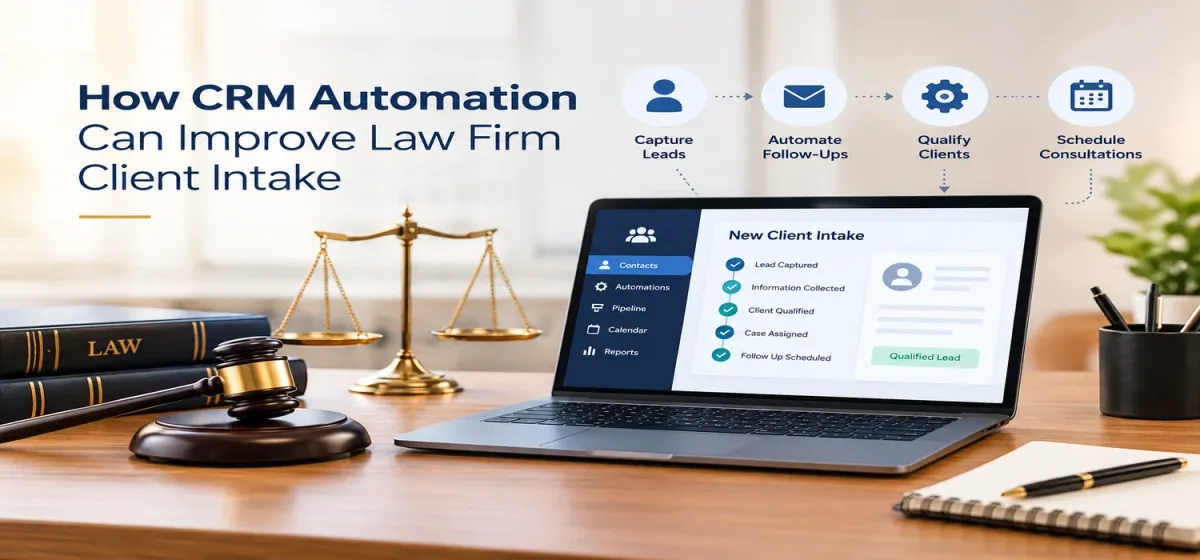
How CRM Automation Can Improve Law Firm Client Intake
Every week, law firms lose signed clients because one competing firm did one thing differently — they were simply faster.
Not better. Not with a nicer website or a bigger ad budget. Just faster, a text that arrived four minutes after the web form submission instead of an email that arrived the next afternoon. In client intake, speed isn't one factor among many. It's most of the game. And it's precisely the part that humans, no matter how dedicated, cannot reliably win, because your team sleeps, goes to court, eats lunch, and handles the client standing in front of them.
This is the void that legal CRM software fills. Not through the elimination of the people working on intake but through the removal of delay, forgetfulness, and leaks through which leads can die.
Let's break down exactly how it works, and where firms get it wrong.
The Intake Problem Nobody Puts in a Spreadsheet
Here's the typical lifecycle of a lead at a firm without an automated intake system:
Prospect fills out a form at 9:40pm on a Tuesday
The submission lands in a general inbox, mixed with newsletters and vendor spam
Someone notices it Wednesday morning, maybe
A paralegal means to call after lunch, gets pulled into something, remembers Thursday
The prospect, meanwhile, had a consultation with a competitor Wednesday at noon
Multiply this pattern across every channel, calls that go to voicemail, chats that get abandoned, referrals who were "definitely going to follow up", and you start to understand why firms routinely convert only a fraction of the leads they're already paying to generate.
None of this happens because your team is careless. It happens because intake is a race measured in minutes, run by people whose job description includes about fifteen other things. The fix isn't working harder. It's building a system where the follow-up doesn't depend on anyone remembering.
Where Law Firm CRM Software Actually Earns Its Keep
Fundamentally, the legal CRM software is simply a database for each lead, with timestamps, source, status, and follow-up steps. Useful. But the automation atop the CRM is where the additional income comes from. These are the six automations that add the most revenue value, in approximate order of importance.
1. Speed-to-Lead: The Ninety-Second Response
This is the highest converting automation for legal intake software. The second the lead is received, whether by form fill, live chat, live-scan analytics, or transcription of after hours voicemail, an automated reply goes out: a personalized text message and email welcoming the lead with a booking link.
The prospect gets an instant touchpoint. Your team gets a logged, assigned lead with a countdown clock on it. And the competitor who responds four hours later is now competing against a consult that's already on your calendar.
In practice, firms that implement instant response automation typically see contact rates jump substantially in the first month, not from more leads, but from leads that were previously going cold in the inbox.
2. Nurture Sequences for the "Not Ready Yet" Majority
Here's a number that changes how smart firms think about intake: most qualified prospects don't book on the first touch. They're researching, comparing, waiting on a spouse, waiting for a payday, or simply not in crisis mode yet.
If you do not use automation, your good leads will be called back once or twice, and that’s all. In case of automation and the use of a nurture sequence, a sequence of texts and emails that gives value (expectations from you, how the process goes on, frequently asked questions), the company remains active during the whole window of time.
The lead that ignored three calls from your office often books a consult off the fifth touchpoint. Automation makes sure the fifth touchpoint actually happens.
3. Pipelines That Mirror Your Actual Practice
Generic CRM stages, "New," "Contacted," "In Progress", tell you nothing useful. Properly configured law firm CRM software uses stages that match how your practice actually works:
New lead → Attempted contact → Consult booked → Consult completed → Retainer sent → Signed → (and for firms that track it: Declined, with a reason code)
Every change of stages in the pipeline could activate its own automations: reminder before consultation, follow-up one day after consultation in case no agreement about retaining was reached, nurturing sequence for declined leads in three months. Pipeline is no longer just a report; it’s a working flow.
4. Appointment Scheduling Without the Phone Tag
"Does Tuesday at 2 work?", "No, Thursday?", "Actually..." Every round of scheduling ping-pong is a chance for the prospect's urgency to cool. Automation kills the dance: qualified leads receive a booking link instantly, pick from your real availability, get automatic confirmations, and get reminder texts at 24 hours and 1 hour before the consult.
The two things always happen in such a case: booking rate increases, and the no-show rate decreases, very often sharply because no-shows are mostly a reminder issue, not a client issue.
5. Internal Routing and Escalation
But not every lead needs to wait in line. With the help of automations rules, the hot leads could be immediately identified and redirected, personal injury case, liability, damages confirmed, criminal case, court date next week, pushing an instant notification to the responsible attorney or senior intake specialist.
The cases that can't wait stop waiting. Everything else flows through the standard queue. Your attorneys stop being interrupted by trivia and stop missing emergencies.
6. Reactivation of Cold Leads
Every firm's database contains a quiet fortune: leads from six months ago who went cold, former clients with new matters, declined cases that are now viable. Automation runs re-engagement campaigns against these segments, a check-in message, an update on a relevant law change, a simple "still need help with this?", at essentially zero marginal cost.
Reactivating a cold lead costs a fraction of generating a new one, and these leads convert surprisingly well because the relationship already exists.
The Compliance Line: What Automation Must Never Do
Because this is legal, a word on boundaries, because "automated" is not a synonym for "unsupervised."
Three rules keep legal CRM automation on the right side of the ethics line:
Never automate legal advice. Nurture content answers general questions ("what happens at a consultation"), never case-specific ones. Anything that touches "do I have a case?" routes to a human, every time.
Honor confidentiality in every touchpoint. Automated messages shouldn't reference case specifics in ways that could expose information if sent to a wrong number, a real risk with texts. Keep automated content generic and welcoming; keep specifics in secure channels after verification.
Keep humans on judgment calls. Automation books, reminds, follows up, and routes. It doesn't decide whether a case is viable, whether a conflict exists, or whether a client relationship should end. Those stay with licensed professionals, consistent with your obligations under ABA Model Rule 5.3 for anything nonlawyers (or automated systems) touch.
The pattern: automate the process, never the judgment.
Build vs. Buy vs. Done-For-You (Briefly, Because It Matters Here)
By now you've probably realized the uncomfortable catch: everything above is configuration, not product. Law firm CRM software ships with the capability for all six automations. None of it works out of the box, and the difference between a firm with a great platform and a firm with a great intake system is almost never the platform.
Three paths, honestly framed:
DIY: Cheapest cash outlay. Costs you weeks of configuration time, ongoing admin attention, and usually ends with three of the six automations actually working. Fine for firms with a genuine ops person and low volume.
Software + consulting: Middle ground. Better setup, but consultants typically leave after the build, and nobody's left running the system daily, which is where DIY firms quietly regress.
Built, automated, and staffed: The whole operation, configured platform, working automations, and trained intake professionals running it, live in days, for a flat monthly cost usually below one local hire. Obviously our model, and obviously biased; but the reason it exists is that the first two paths kept producing the same result: great software, leaky intake.
What the Results Look Like in Practice
Firms running properly automated intake systems tend to report a consistent pattern in the first 60–90 days:
Contact rates climb, instant response captures the leads that previously went cold waiting for a callback
Consult bookings rise, often 20–40% from the same lead volume, because follow-up stops depending on memory
No-shows drop, automated reminders recover the consults that silent prospects would have skipped
Marketing spend sharpens, source tracking reveals which channels produce signed cases and which produce expensive voicemail
The team gets calmer, intake stops being the chaotic interruption layer and becomes a visible, manageable system
None of this requires more leads. It requires stopping the leak on the leads you already have.
Frequently Asked Questions
What is the best law firm CRM for client intake?
For the vast majority of growing firms, Clio Grow, Lawmatics, and Lead Docket would be the best legal-specific CRM tools, but depending on your practice type, number of cases, and whether you already use practice management software within one ecosystem, some will be better than others. It's more important how the tool is set up rather than what it is: a mid-level tool configured right outperforms a premium tool out of the box.
How much does legal CRM automation cost?
Software subscriptions typically run $50–$150 per user per month. It's the higher price of the setup and management. Configuring the automation requires a lot of knowledge and an unmanaged system deteriorates over time. Turnkey intake operation (technology, automation, and staff) is priced similarly to one local administrative hire.
Can CRM automation replace my intake staff?
No, it shouldn't be. Automation solves the problem of speed, consistency, and volume: immediate responses, follow-ups, sequences, and routing. Humans solve problems of judgment and empathy and qualification conversations. The best intake operations utilize both: automation for process and trained people for conversations. Automation of conversations usually costs conversions. not saves money.
How long does it take to set up legal CRM automation?
A properly configured system, pipelines, all core automations, testing, typically takes days with an experienced team doing the build. DIY timelines usually stretch to weeks because the learning curve is real. Either way, the setup is a one-time cost; the automation runs forever after.
Is automated follow-up compliant with attorney ethics rules?
Absolutely, but only if structured properly. Messages should never include legal guidance or assessment of cases, all communications should be kept confidential regardless of the platform used, and human supervision should follow the decision-making processes. ABA Model Rule 5.3's supervisory requirements extend to automated procedures exactly the same way they do to the work of non-lawyers, which explains why it is essential to have a clearly delineated workflow.
Client intake is a race, and your law firm is racing using a clipboard while others use a CRM system. Automating your client intake process will not make your firm more distant or cold, but rather will make your law firm faster, more consistent, and more available when it counts the most.
The leads are already coming. The only question is whether something answers them at 9:40pm on a Tuesday.
If you would like to take a look at how an intake automation system would look like for your specific legal niche and get up and running in a matter of days, not quarters, schedule your free strategy session with us. We will conduct an audit of your existing intake process and show you how you can improve and automate it. Worst-case scenario: you walk out with your data. Best case scenario: you never see Tuesday nights again.